

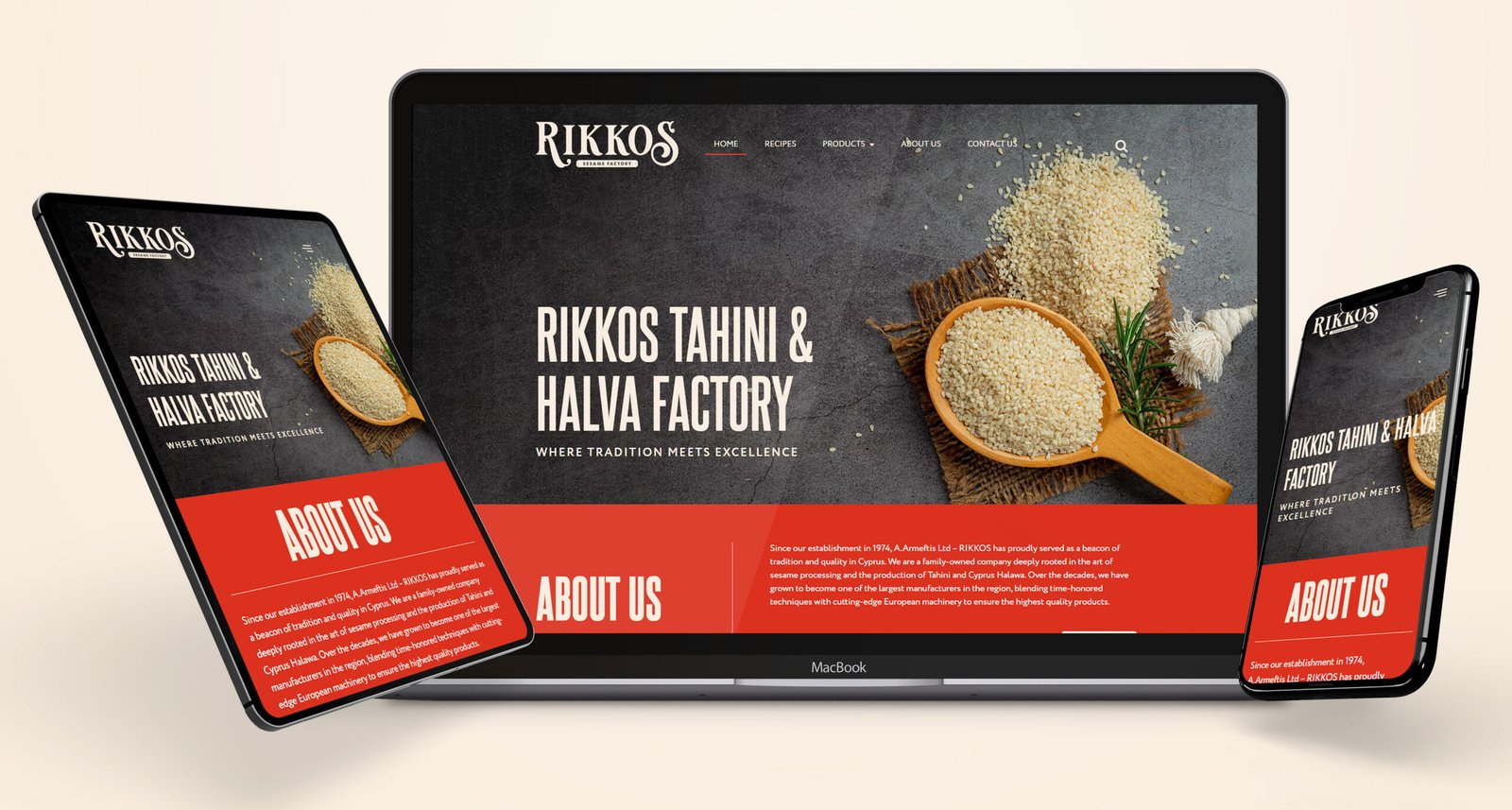

Project Overview
RIKKOS (A. M. Armeftis Co Ltd) is a BRC-certified sesame processing company founded in 1974 in Limassol, Cyprus — one of the largest regional producers of Traditional Tahini and Cyprus Halawa. The project involved converting a professionally crafted Figma design into a production-ready WordPress website using Elementor Pro as the build layer and Custom CSS for pixel-level design fidelity. The deliverable was a five-page site covering Home, Products, Recipes, About Us, and Contact.
Business Goals
The client arrived with a completed Figma design file — a clear visual brief built around RIKKOS’s Mediterranean heritage and premium product positioning. The primary goal was implementation without compromise: every spacing value, typographic decision, and layout detail from the design had to carry through to the live site without drift. Beyond fidelity, the site needed to be fully manageable by non-technical staff for routine content updates, and it had to perform correctly across desktop, tablet, and mobile.
Website Strategy
Because the design was already defined in Figma, the strategy phase focused on build planning rather than creative direction. The Figma file was audited before a single element was built in WordPress — identifying which sections could be constructed as reusable Elementor templates versus which required one-off Custom CSS solutions. This pre-build analysis prevented mid-project refactoring and created a consistent implementation path across all five pages.
The Header and Footer were built first as Elementor global templates, locking in brand consistency before any interior pages were assembled. Each page was then built in sequence, referencing the Figma frames directly and cross-checking measurements against the extracted spacing values.
Design & Development Process
The Figma design established a distinct visual language: warm Mediterranean tones, generous whitespace, structured product imagery, and a clean typographic hierarchy using a specific font pairing with defined weight and letter-spacing values. Translating this into Elementor Pro required rebuilding every section with precise column ratios, padding values, and typographic scale — extracted directly from the Figma file, not approximated visually.
Google Fonts were configured to match the exact font families, weights, and letter-spacing values from the Figma typography styles. Elementor Pro’s Typography settings were used for base configuration, with Custom CSS layered on top to handle the details Elementor’s GUI doesn’t expose: specific letter-spacing on headings, baseline alignment on mixed-size type combinations, and custom border-radius values on product cards and CTA buttons.
The “Why Choose Us” trust section — one of the homepage’s key conversion elements — was built as a three-column icon-and-text grid matching the Figma specification precisely, with custom hover states on the icon components written in CSS and not available in Elementor’s default widget controls.
Technical Implementation
The build stack was WordPress with Elementor Pro as the primary page builder. Elementor’s additional_custom_breakpoints feature was activated immediately, enabling a three-breakpoint responsive system that matched the Figma file’s desktop (1440px), tablet (768px), and mobile (375px) frame set — rather than Elementor’s default two-breakpoint approach.
Custom CSS was applied at three distinct levels throughout the build:
- Global stylesheet — base resets, font rendering optimisation, and body-level defaults that ensure cross-browser consistency from the first page load
- Section-level CSS — layout overrides for spacing, stacking behaviour, and flexbox properties that Elementor’s column system cannot achieve natively
- Widget-level CSS — interactive states including button hovers, navigation dropdown behaviour, and product card border treatments that match the Figma prototype’s interaction specs
The navigation dropdown was extended with Custom CSS to replicate the exact dropdown width and hover transition timing shown in the Figma design — Elementor’s default nav menu widget provides the structure, but the visual behaviour required CSS overrides on the submenu container and link elements.
User Experience Improvements
The Figma design’s user journey was implemented without modification, preserving the conversion logic embedded in the original design. The homepage flows from a hero section carrying the brand’s core positioning (“Where Tradition Meets Excellence”) through a trust-signal strip, into product feature cards with direct links to product detail pages, and finally into the Recipes section — a content loop that keeps consumers on-site longer while demonstrating product versatility to trade buyers.
Navigation clarity at the implementation stage required deliberate CSS attention. The Products dropdown was configured to match the Figma design’s hover states, dropdown width, and link spacing exactly — details that distinguish a precisely implemented design from a template approximation.
Performance Optimization
Two performance configurations were applied at the WordPress and Elementor level before launch. CSS file delivery was set to external output (css_print_method-external), preventing render-blocking inline styles and reducing the initial HTML response size. Google Fonts were loaded with font_display: swap, eliminating the flash of invisible text that affects sites loading custom webfonts over slower connections — a particularly important detail for a brand site where typography carries the visual identity.
Elementor Pro’s asset loading was configured to load component-specific scripts only on the pages that use those components, rather than enqueueing the full widget library globally. This reduces JavaScript payload on simpler pages like Contact and About, where interactive components are minimal.
Mobile Optimization
The Figma file included complete mobile breakpoint frames at 375px — not wireframe-level sketches, but fully resolved layouts with stacked columns, adjusted image ratios, reconfigured font sizes, and reordered content blocks. Each of these was implemented using Elementor Pro’s responsive panel at the custom mobile breakpoint, with order property CSS used on specific flex containers where Elementor’s native column reordering didn’t match the Figma specification.
Touch targets on CTA buttons and navigation links were checked against the 44×44px minimum and adjusted using Custom CSS padding where Elementor’s button widget defaults fell short. The product image grid transitions from three columns at desktop to a single-column stack at mobile, with font sizes and line heights adjusted per breakpoint to maintain readability at every screen width.
Conversion Optimization
Every conversion path from the Figma prototype was mapped to the live build and verified. The primary CTA in the homepage hero leads to the Products section. The secondary CTA in the About section routes to the Contact page. The Recipes section carries internal links back to product pages, creating the browsing loop specified in the original design.
A modal popup — configured using an Elementor-compatible modal component — provides an active lead capture layer matching the popup design from the Figma file. Custom CSS handled overlay opacity, content padding, and the close button positioning to match the Figma specification precisely.
Final Outcome
The delivered site is a faithful implementation of the RIKKOS Figma design across all five pages and three responsive breakpoints. Non-technical staff can update product descriptions, page content, and images without developer access through Elementor’s editor interface. RIKKOS has a production-ready digital presence that reflects 50 years of manufacturing heritage — built to the precision standard the Figma design required and stable enough to serve as a long-term platform for the brand.
Conclusion
A Figma to WordPress conversion project is a test of implementation discipline. For RIKKOS, closing the gap between design file and live site required systematic spacing extraction, three-tier Custom CSS architecture, and deliberate Elementor Pro configuration across a custom breakpoint system. The result is a site that looks exactly as designed and performs exactly as intended — which is what a rigorous Figma to WordPress conversion process should always deliver.