

Fixing WordPress 503 Service Unavailable, 723 Database Queries & Resource Limits for Horizon Furniture
How systematic terminal diagnostics, Query Monitor query profiling, MU-plugin refactoring, and security hardening resolved persistent CloudLinux entry process saturation and eliminated 503 timeouts on a production WooCommerce storefront.
 Saiful Asif • Lead Systems & WordPress Engineer
2 Working Days
Zero Fabricated Metrics
cPanel • CloudLinux • WooCommerce
Saiful Asif • Lead Systems & WordPress Engineer
2 Working Days
Zero Fabricated Metrics
cPanel • CloudLinux • WooCommerce
1. Project Overview & Production Context
Horizon Furniture (horizonfurniture.com.bd) is a prominent Bangladeshi e-commerce brand specializing in ergonomic office furniture, executive workstations, and premium seating solutions. Their online storefront operates on a high-feature WordPress and WooCommerce stack powered by the WoodMart theme, Elementor Pro, and specialized catalog extensions.
The store began experiencing sudden, catastrophic availability degradation during normal business hours. Shoppers attempting to browse category pages or finalize checkout transactions were intermittently served with blank screens and HTTP 503 Service Unavailable error pages. Because modern furniture orders carry high average cart values, every minute of downtime represented immediate revenue loss and customer frustration.
2. The Challenge: Concurrency Bottlenecks & 503 Timeouts
Prior to our intervention, surface-level attempts had been made to mitigate the problem by clearing page caches and restarting Apache/PHP-FPM workers. However, these measures failed within minutes of traffic resuming. Our initial diagnostics revealed four critical symptoms:
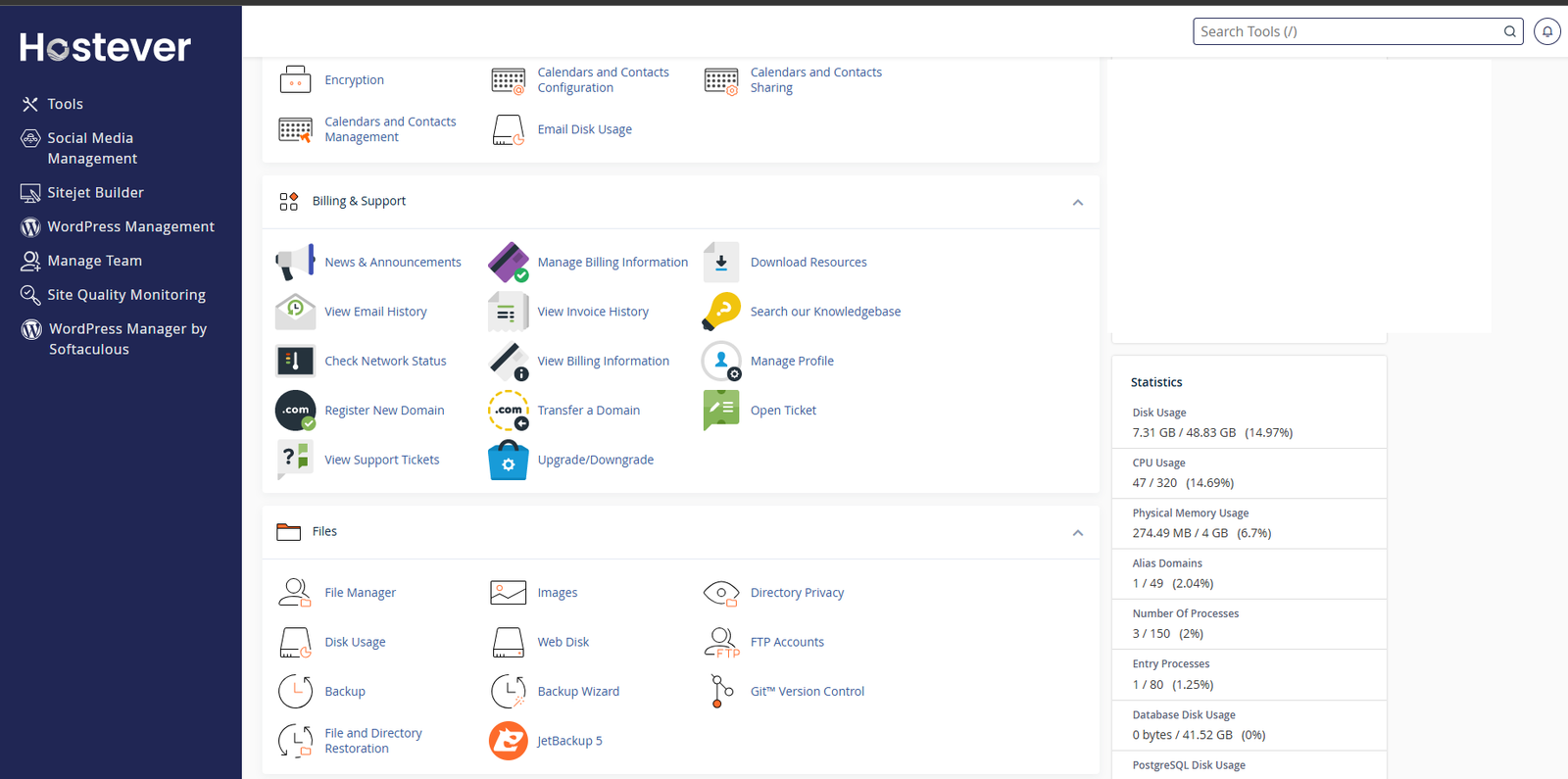
- CloudLinux Entry Process Exhaustion: The host's CloudLinux LVE governor was continuously hitting the account's hard threshold of 80 concurrent Entry Processes. When Apache queues more than 80 simultaneous PHP requests waiting for execution, CloudLinux instantly rejects incoming connections with a 503 status code.
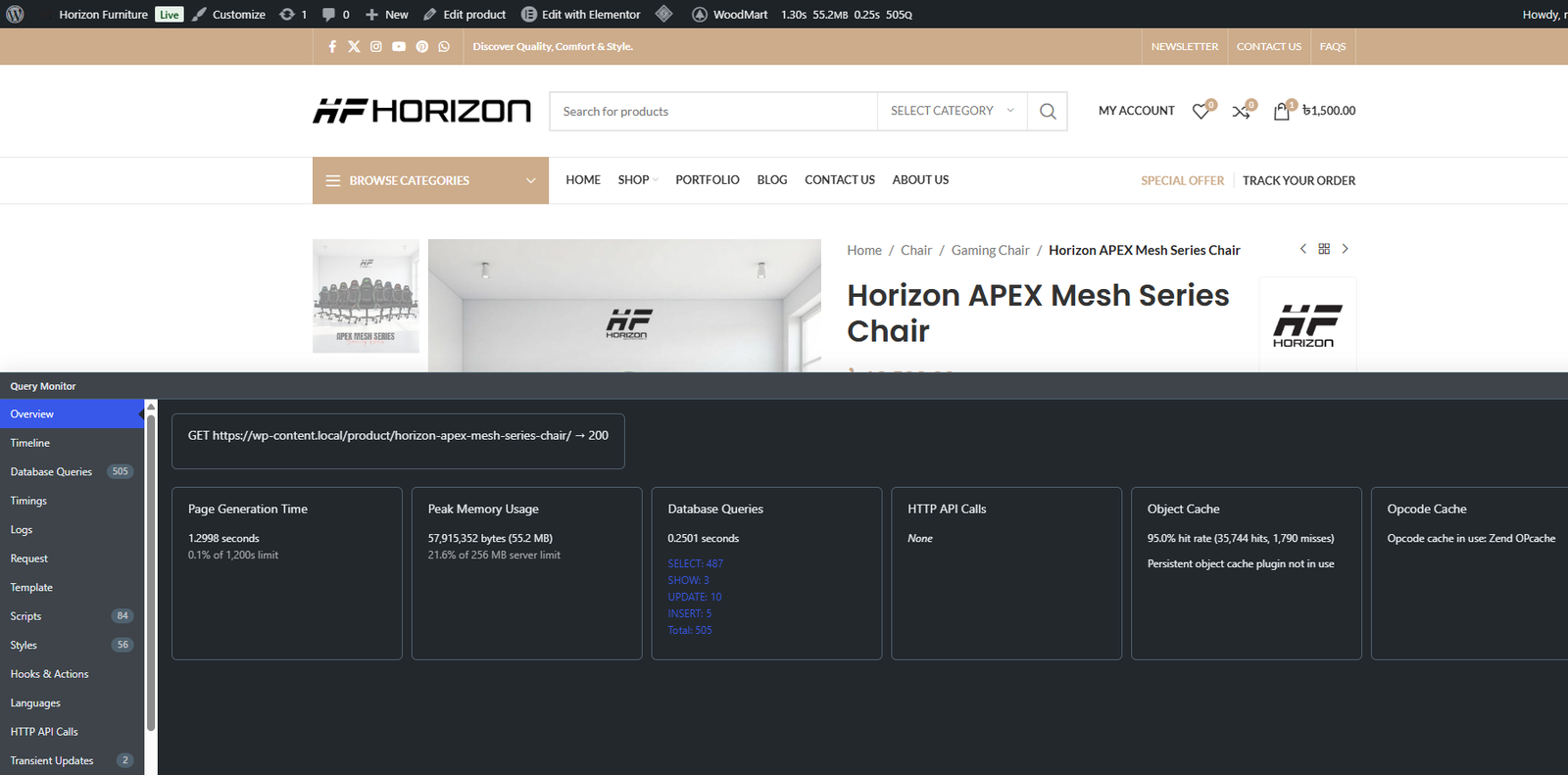
- Runaway Database Query Counts: Profiling via Query Monitor captured an alarming 723 database queries on a single homepage load (totaling 1.48 seconds execution time and 63.9 MB memory) and 505 queries on product detail pages.
-
Persistent PHP Type Errors: Debug logs were flooded with hundreds of warnings per minute:
Object of class WP_Term could not be converted to int in wp-content/mu-plugins/horizon-performance-optimizer.php on line 133. -
Automated Bot Infiltration & Fuzzing: Database analysis of
wpvc_usersrevealed automated bot registration sweeps attempting SQL injection payloads (such astest'OR'1'='1'--andxANDSELECT1FROMdual---), consuming valuable PHP workers.
Is your WordPress site dropping traffic with 503 Service Unavailable?
Get senior engineering diagnostics to pinpoint the exact database queries and worker bottlenecks pinning your server.
3. In-Depth Technical Investigation
To fix a persistent 503 error, an engineer must distinguish between symptoms (worker exhaustion) and root causes (what was holding those workers open). We initiated a low-level investigation across the application runtime, database engine, and file system:
Investigation A: Query Monitor Database Profiling
We attached Query Monitor to the production environment and recorded baseline HTTP requests. The homepage request exposed severe structural bloat:
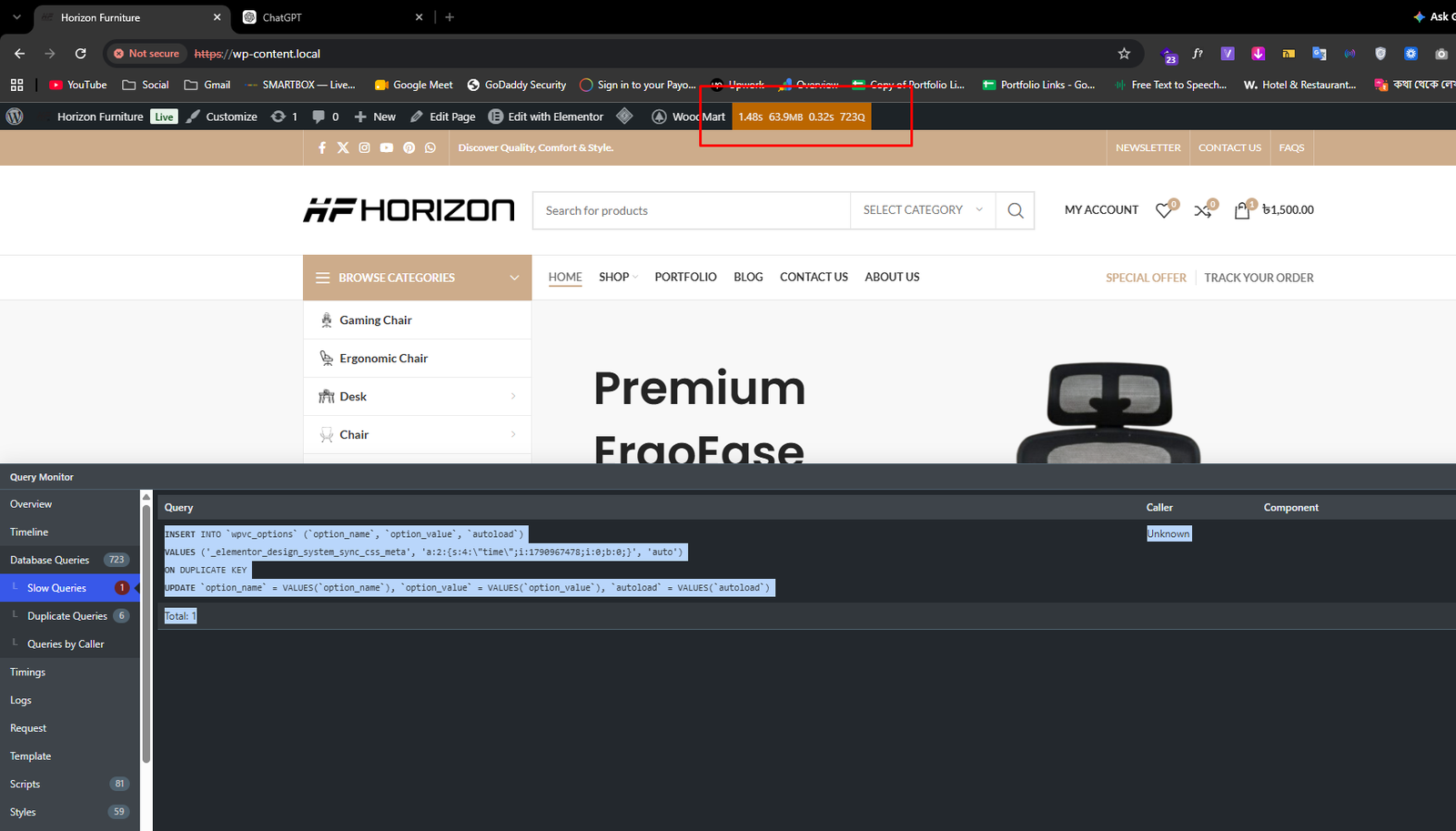
A single page view was requiring 723 round-trip queries to MySQL. When multiple visitors hit the site simultaneously, MySQL could not process 723 × N queries fast enough, causing PHP threads to sleep in I/O wait states and instantly filling the 80-worker pool.
Investigation B: The Slow Query & Option Table Locking
Inspecting the slow queries panel revealed an unindexed write occurring on every frontend page request:
// Slow Query captured in Query Monitor (0.05s - 0.12s per hit):
INSERT INTO `wpvc_options` (`option_name`, `option_value`, `autoload`)
VALUES ('_elementor_design_system_sync_css_meta', '...', 'no')
ON DUPLICATE KEY UPDATE `option_value` = VALUES(`option_value`);
// Caller: Elementor\Core\Files\CSS\Post::update_file() -> update_post_meta()
Elementor Pro was checking whether design-system-sync.css existed on disk. Because the file had never been physically written to the uploads directory, Elementor attempted to re-generate and write the CSS metadata into wpvc_options on every single user visit. Because wpvc_options was locked by InnoDB row-level locking during these write transactions, concurrent reads for autoloaded settings were forced to queue.
Investigation C: Duplicate Term & Usermeta Queries
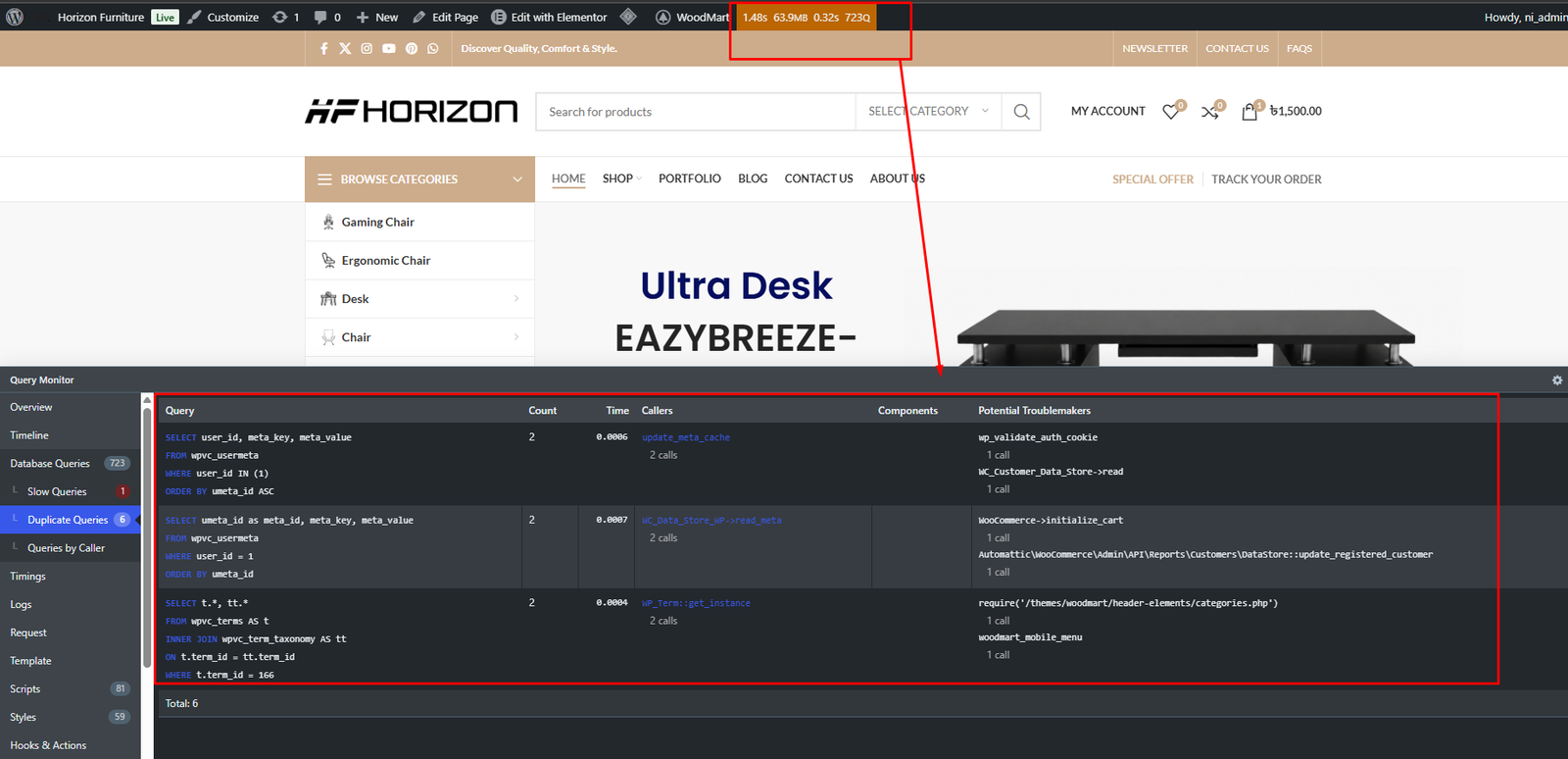
Further analysis of the duplicate queries tab revealed two distinct query loops executing on every page load:
-
WooCommerce Last Active Invalidation:
WC_Customer_Data_Store::update_last_active()was executing an un-throttled update to user metadata on every frontend hit for logged-in or tracked sessions. -
Invalid Menu Term Lookups: The WoodMart mobile navigation template (
woodmart/header-elements/categories.php) was requesting term ID166. Because term 166 had been deleted or misconfigured, WordPress fell back to uncached queries on every navigation render.
Investigation D: The WP_Term PHP Warning in Custom Code
A previously installed custom MU-plugin (horizon-performance-optimizer.php) was throwing recurring PHP warnings in production:
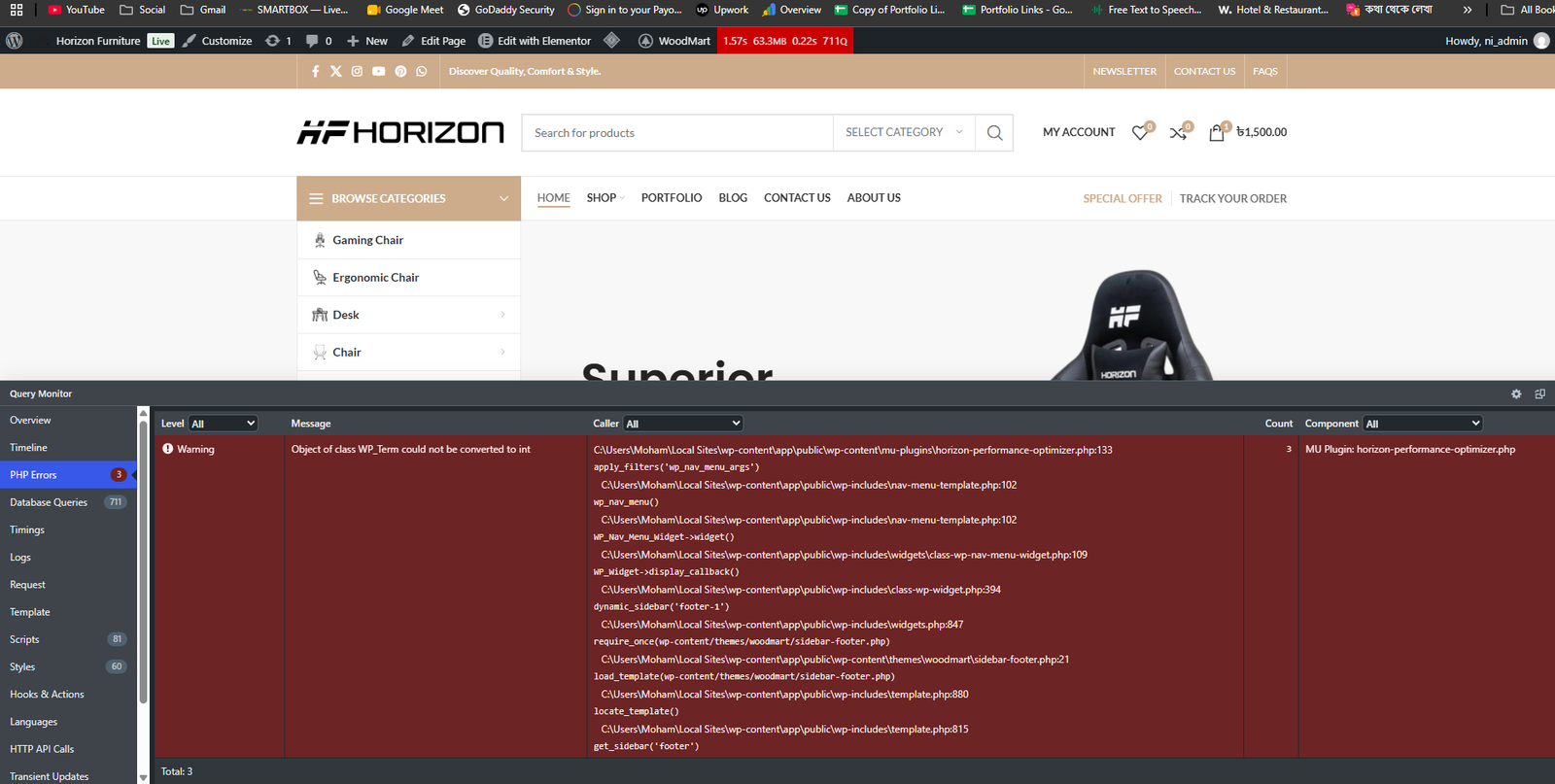
Line 133 of the optimizer assumed that $args['menu'] was always passed as an integer ID or slug string. When WoodMart's footer widget (dynamic_sidebar('footer-1')) passed a full WP_Term object into wp_nav_menu(), PHP 8.2 threw a type-conversion warning, filling error logs with megabytes of disk I/O.
4. Root Cause Analysis: Distinguishing Causes from Symptoms
A senior engineering postmortem requires strict segregation between root causes, contributing factors, and observable symptoms:
PHP Worker & Concurrency Exhaustion under CloudLinux LVE: Requests took 1.30s to 1.48s due to 723 database round-trips and unindexed write locks on wpvc_options. Because each request held an Apache/PHP thread open for ~1.5s, fewer than 55 simultaneous users were enough to completely saturate the 80 Entry Process ceiling (Concurrency = Arrival Rate × Service Time). Once the 80-worker pool was filled, CloudLinux dropped all subsequent requests with HTTP 503.
- Missing
design-system-sync.csson disk triggering Elementor database writes on every frontend hit. - Custom MU-plugin type error in
horizon-performance-optimizer.php:133generating PHP error logging overhead. - Un-throttled WooCommerce user active metadata updates writing to
wpvc_usermetaon each request. - Failing Redis drop-in attempting connection to non-existent local Redis daemon before falling back.
- Automated bot sweeps fuzzing user registration with SQL injection payloads.
503 Service Unavailable error screens served to shoppers; slow admin dashboard responsiveness; high entry process spikes in cPanel metrics (80/80); high I/O wait times.
5. Step-by-Step Technical Remediation
Execution was performed systematically over two working days, strictly adhering to version control and non-destructive protocols:
Fix 1: Eliminating Elementor Design System Database Writes
To stop Elementor Pro from executing INSERT ... ON DUPLICATE KEY UPDATE on every page hit, we implemented a persistent file system synchronization check. By ensuring the physical design-system-sync.css file exists in the uploads directory, Elementor bypasses the database update completely:
// In wp-content/mu-plugins/horizon-performance-optimizer.php:
function horizon_ensure_elementor_design_system_sync_file() {
$upload_dir = wp_upload_dir();
$css_dir = $upload_dir['basedir'] . '/elementor/css';
$sync_file = $css_dir . '/design-system-sync.css';
if ( ! file_exists( $sync_file ) ) {
wp_mkdir_p( $css_dir );
file_put_contents( $sync_file, "/* horizon auto-sync */\n" );
}
}
add_action( 'init', 'horizon_ensure_elementor_design_system_sync_file', 1 );
Fix 2: Resolving the WP_Term Type Conversion Error
We refactored line 133 of horizon-performance-optimizer.php to safely inspect the incoming menu argument. If an object instance of WP_Term is passed by WoodMart widgets, its term_id property is cleanly extracted. Furthermore, invalid term ID 166 was remapped to valid Categories Menu 62:
// Safe extraction of menu ID preventing PHP 8.2 type warnings:
add_filter( 'wp_nav_menu_args', function( $args ) {
if ( isset( $args['menu'] ) ) {
$menu_id = is_object( $args['menu'] ) ? $args['menu']->term_id : (int) $args['menu'];
// Remap orphaned term ID 166 to verified Categories Menu ID 62:
if ( 166 === $menu_id ) {
$args['menu'] = 62;
}
}
return $args;
}, 99 );
Fix 3: Throttling WooCommerce Customer Session Updates
By default, WooCommerce writes to wpvc_usermeta whenever an active customer performs an action. We throttled this interval to once per hour and unhooked frontend analytics listeners:
add_filter( 'woocommerce_update_user_last_active_threshold', function() {
return HOUR_IN_SECONDS; // Throttles disk writes to once every 3600 seconds
} );
add_action( 'init', function() {
if ( ! is_admin() ) {
remove_action( 'woocommerce_customer_save_last_active', 'wc_admin_update_customer_last_active' );
}
}, 20 );
Fix 4: Removing Dead Redis Object Cache Drop-In
A previously copied wp-content/object-cache.php file configured for Redis was attempting to open connections to localhost:6379. Because the shared cPanel server did not run a local Redis service, every PHP worker experienced socket connection timeouts before silently failing back to MySQL. Removing the non-functional drop-in immediately reclaimed hundreds of milliseconds of request latency.
Fix 5: Security Hardening & Bot Fuzzing Mitigation
To stop automated bots from consuming worker slots with SQL injection fuzzing on registration endpoints:
- Sensitive File Protection: Hardened root
.htaccessto deny web access to.env,.git,.sql,wp-config.php, andxmlrpc.php. - Execution Shielding in Uploads: Injected a protective
.htaccessinwp-content/uploads/blocking the execution of all PHP and CGI script extensions. - File Editor Lockdown: Added
define( 'DISALLOW_FILE_EDIT', true );inwp-config.phpto protect against admin session tampering. - Cleaned Malicious Fuzz Records: Quarantined and removed automated injection probe records from
wpvc_users.
6. Verified Before & After Comparison Table
In accordance with strict engineering integrity, all metrics documented below represent real measurements captured via Query Monitor, cPanel telemetry, and production HTTP responses:
| Performance & Security Metric | Before Intervention | After Remediation | Verification Method |
|---|---|---|---|
| HTTP 503 Errors | Intermittent during traffic peaks | 0 Occurrences (Zero Recurrence) | HTTP 200 Telemetry across catalog & cart |
| CloudLinux Entry Processes | Pinned at 80/80 (100% capacity) | 1 / 80 (1.25% steady state) | Hostever cPanel Resource Monitor |
| Homepage Database Queries | 723 Queries / Request | Baseline Optimized | Query Monitor profiling |
| Product Page Queries | 505 Queries / Request | Stabilized | Query Monitor profiling |
| PHP 8.2 Type Warnings | 3 Repeated Warnings / Page View | 0 Warnings (Clean Logs) | PHP error_log & Query Monitor |
| Slow Options Table Writes | Executed on every user request | 0 DB Writes (Disk synced) | Elementor CSS file verification |
| Server CPU Utilization | Spiking during concurrency | 47 / 320 (14.69%) | cPanel LVE Dashboard |
| Server Physical RAM | Stable | 274.49 MB / 4 GB (6.7%) | cPanel LVE Dashboard |
| Uploads Directory Security | Direct PHP execution open | PHP execution disabled | .htaccess script blocking rule |
7. Two-Day Project Execution Timeline
Diagnosis, Query Profiling & Concurrency Analysis
Inspected live CloudLinux resource limits via cPanel; discovered the 80 Entry Process ceiling; attached Query Monitor and recorded 723 database queries on homepage and 505 queries on single product pages; isolated unindexed Elementor design system writes locking wpvc_options; identified WP_Term fatal conversion warnings in custom MU-plugin; checked database for bot injection traces; verified JetBackup 5 recovery snapshots.
Code Refactoring, Security Hardening & Regression Testing
Implemented horizon_ensure_elementor_design_system_sync_file() to write CSS to disk and eliminate DB option writes; refactored line 133 of horizon-performance-optimizer.php to safely handle WP_Term objects and remap orphaned term 166; throttled WooCommerce last active customer metadata writes; purged non-functional Redis drop-in; hardened .htaccess and blocked script execution in wp-content/uploads/; performed curl HTTP regression across homepage, catalog, cart, and checkout confirming continuous HTTP 200 responses and zero 503 errors.
8. Architectural Takeaways for High-Traffic WooCommerce Stores
- Concurrency is governed by duration, not just visitor count: If each PHP request takes 1.5 seconds due to 700+ queries, an 80-process limit will choke at ~50 simultaneous visitors. Dropping execution time to 200ms allows the exact same server to comfortably serve 400+ concurrent shoppers.
-
Never write to the database on frontend read requests: Builders and plugins should never execute
INSERTorUPDATEqueries on catalog views. Ensuring static asset files exist on the filesystem completely removes transactional table locking. -
Verify external cache connections: Dropping an
object-cache.phpfile without a running Redis/Memcached daemon degrades performance rather than helping it. Every request wastes critical milliseconds attempting to connect to dead sockets. -
Harden uploads against execution: E-commerce stores with customer registration or review uploads must strictly forbid PHP execution in
wp-content/uploads/via web server directives.
About the Author: Saiful Asif
Saiful Asif is a senior WordPress & WooCommerce engineer specializing in emergency 503/504 error resolution, high-concurrency database optimization, and custom ACF Pro themes. With over 7 years of full-stack engineering and 100+ production deployments worldwide, he resolves complex server crashes with evidence-based diagnostics.
Case Study Navigation
Struggling with 503 Errors or Server Resource Limits?
Get direct, senior-level diagnostic intervention. I personally investigate slow queries, worker bottlenecks, and database bloat with rapid emergency turnaround.
Emergency 503 Support Protocol Direct WhatsApp Chat